
Generate Custom Stamp from Text Prompt: The Ultimate AI Guide
Table of Contents
You need a custom stamp design, but you are not a graphic designer. Hiring a professional takes time and money, and drawing it yourself might not look professional.
This is where PixSprout's AI Stamp Generator changes the game.
New AI technology allows you to generate custom stamp from text prompt in seconds. You simply type what you want—whether it's a complex vintage logo or a simple office seal—and our software creates the visual file for you instantly.
This guide explains how to use text prompts to get the perfect stamp design using PixSprout.
Why Use AI for Stamp Design?
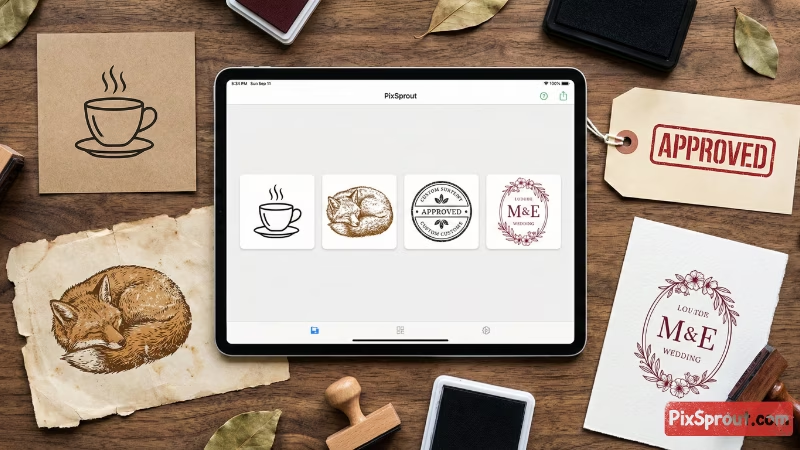
The most powerful way to generate a stamp today is with Artificial Intelligence. Unlike old template builders that restrict you to fixed shapes, AI understands your creative vision.
This method is perfect for:
- Company Logos: Combine text with unique icons.
- Wedding Seals: Create romantic floral or animal motifs.
- Vintage Illustrations: Get that authentic "engraved" look.
- Custom Signatures: Turn your name into a stylized brand mark.
How PixSprout Works You enter a detailed "prompt" into our Text to Stamp Generator. The AI analyzes your words and creates a brand new image from scratch. It automatically adds a "stamp" texture, making the lines look like rough ink pressed onto paper, ready for use.
How to Write the Perfect Stamp Prompt
Getting a professional result depends on your description. If you just type "cat stamp," the result might be too generic. To get exactly what you want, you need a formula.
Use this simple structure for your text prompt in PixSprout:
[Subject] + [Art Style] + [Shape] + [Texture/Details]
Prompt Examples to Try:
- For Business:
- "Coffee cup icon with steam, minimalist line art style, circular border, thick black lines."
- For Weddings:
- "Two intertwined floral vines with initials A and B, vintage botanical illustration style, oval shape, rubber stamp texture."
- For Crafters:
- "Cute sleeping fox, hand-drawn sketch style, thick outline, grunge ink effect, no background."
- For Office Use:
- "Text 'APPROVED' inside a rectangular border, bold stencil font, gritty texture."
Pro Tip: Be clear about the details. If you want it to look old, use words like "distressed," "grunge," or "worn." If you want it clean, use "vector style," "clean lines," or "minimalist."
Beyond Just Pictures: Text-Based Stamps
Sometimes you don't need a complex illustration. You just need text arranged in a specific shape, like a notary stamp, a return address, or a simple "Thank You."
With PixSprout, you don't need a separate tool. You can simply describe the layout.
- Prompt: "A circular seal with the text 'Official Document' curved along the top and 'Do Not Copy' along the bottom, simple line border."
Our AI handles the text wrapping and layout for you, generating a unique design that looks like a real physical impression, not just a digital font.
From Digital File to Physical Stamp
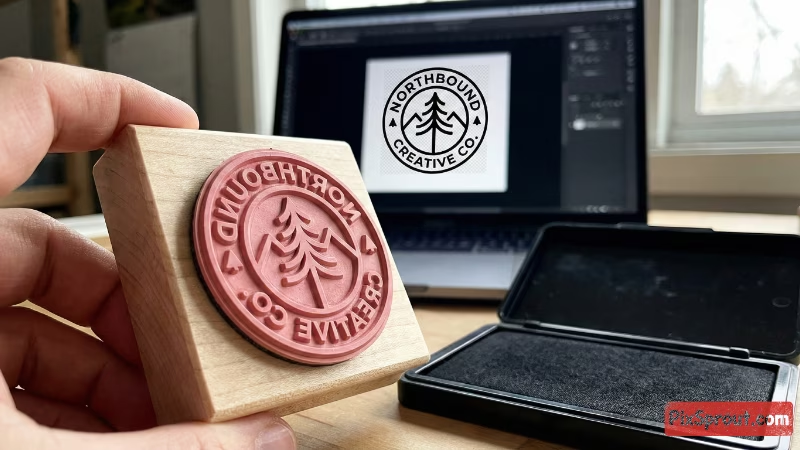
PixSprout generates a high-quality digital image file (PNG) with a transparent background. You can use this file digitally on websites, email signatures, or invoices.
However, many users want a physical rubber stamp. Here is how to bridge the gap:
- Generate & Download: Create your design on PixSprout and download the high-resolution PNG.
- Check the Lines: Our AI ensures high contrast (black and white), which is exactly what laser engravers need.
- Find a Manufacturer: Upload your PixSprout design to a physical stamp maker service (like Vistaprint or a local shop).
- Select the Size: Since our files are high quality, they can be scaled to fit most standard stamp handles.
Frequently Asked Questions
1. Can I use these designs for my business logo? Yes. When you generate a stamp with PixSprout, you can use it for your branding, packaging, or business documents.
2. What file format do I get? We provide a transparent PNG. This is the industry standard for stamps because it allows you to place the stamp over any background (like a colored paper texture) without a white box appearing around it.
3. I'm not good at writing prompts. What should I do? Start simple! Describe the object you want, and then add the word "stamp" or "vector line art." You can always refine your prompt and try again until the result is perfect.
Start Designing Now
Creating a custom stamp is no longer difficult. You don't need to learn Photoshop or hire a freelancer.
Whether you need a creative logo, a wedding seal, or an office marker, just describe it, and let AI do the drawing.
Ready to create? 👉 Try the Text to Stamp Generator Now
Recommended Posts
Stop Getting Hand Cramps: The Brutal Truth About Signature Stamp Makers
Tired of signing hundreds of checks by hand? Most custom signature stamps end up looking like smudged garbage. Here's exactly how to get one that actually works.
Custom Stamp Maker Guide: DIY Machines vs. Pro Services vs. AI Tools
Stop wasting money on bad ink. Here’s the honest truth about custom stamp makers, from the Silhouette Mint to digital AI design tools.
AI Stamp Maker: Stop Overpaying for Custom Digital Seals (2026 Guide)
Still waiting days for a designer to make a simple stamp? Stop. Here’s how AI stamp makers let you generate custom, vintage, or business seals in seconds.
Pet Memorial Stamp Design Maker: Turning Memories into Keepsakes
The house feels too quiet? Create a custom pet memorial stamp to honor your best friend. A simple, heartfelt guide to turning photos into lasting tributes.
Custom Portrait Stamp Maker for Wedding: The DIY AI Guide
Don't pay the 'wedding tax' for custom art. Learn how to use AI to generate your own wedding portrait stamp design in seconds with PixSprout.
Convert Logo to Stamp PNG Transparent: The 'No-Stress' Guide
We've all struggled with Photoshop masks. Here is how to convert your logo to a realistic stamp PNG without losing your mind.
Comments
No comments yet